---
title: What are Future Orders?
description: Everything you need to know about future orders.
---
[Skip to content](https://kb.smooth.tech/knowledge/what-are-future-orders#main-content)
English
Show submenu for translations
[Report An Issue](https://kb.smooth.tech/knowledge/kb-tickets/new?hsLang=en)
![CBF2D5DD-379E-4240-B922-9B02697B7958-2.png\]](https://kb.smooth.tech/hs-fs/hubfs/CBF2D5DD-379E-4240-B922-9B02697B7958-2.png?height=50&name=CBF2D5DD-379E-4240-B922-9B02697B7958-2.png)
Open main navigation
Close main navigation
- English
Show submenu for translations
- [Report An Issue](https://kb.smooth.tech/knowledge/kb-tickets/new)
- Check out our website
Check out our website
How can we help you?
- There are no suggestions because the search field is empty.
1. [Knowledge Base](https://kb.smooth.tech/knowledge?hsLang=en)
2. [Merchant Tablet](https://kb.smooth.tech/knowledge/merchant-tablet?hsLang=en)
3. [Order Management](https://kb.smooth.tech/knowledge/merchant-tablet?hsLang=en#order-management)
# What are Future Orders?
## Everything you need to know about future orders.
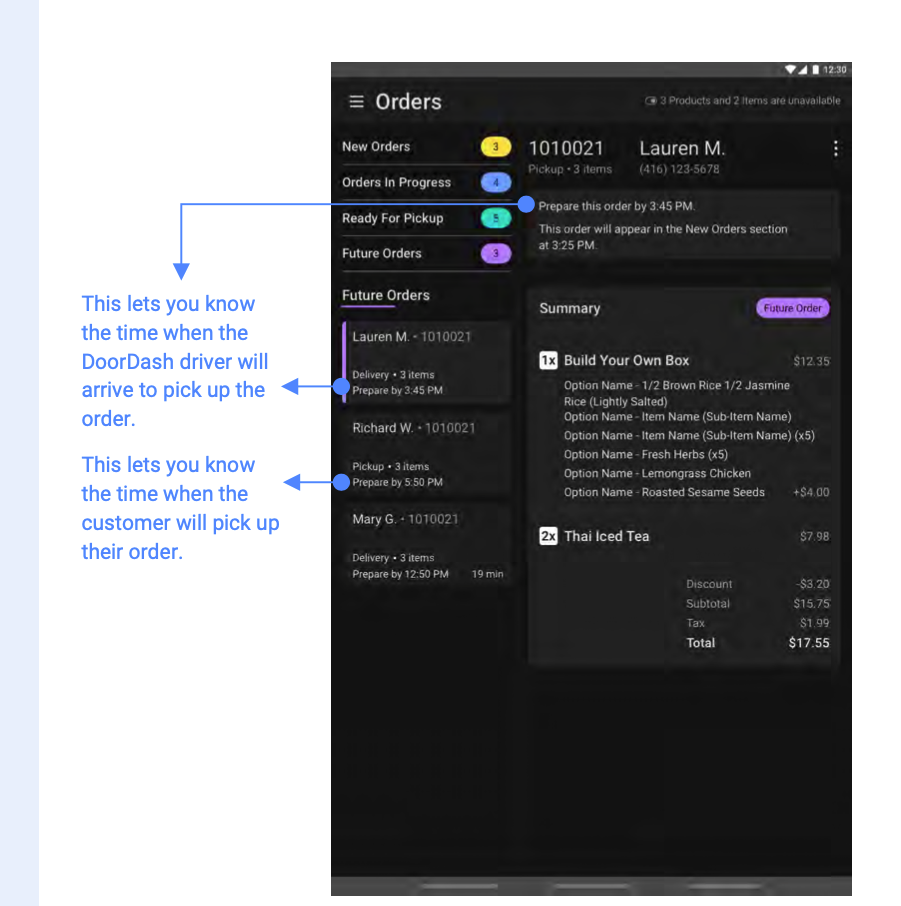
A future order is a an order that has been placed via a your app or web ordering platform for a future date and time.
When this type of order comes into the tablet, it will filter to the Future Orders section within the Orders.
Future orders will move to New Orders based on the minimum preparation time you have set up with Smooth Commerce.
**1. Future Orders x Doordash Drive**
**2. Future Orders x Own Delivery**
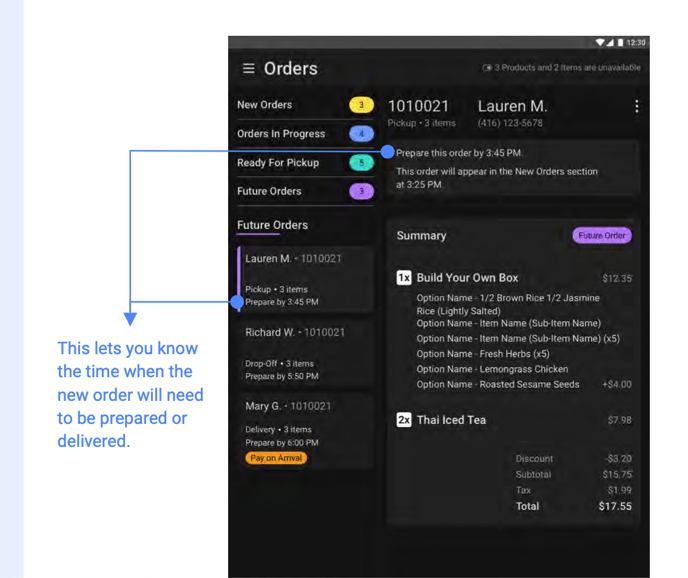
If a future order comes in for a time and date that you will not be able to accomodate, you can reject the Future Order. This will automatically notify the users that you will be unable to fulfill the order.
- [Portal](https://kb.smooth.tech/knowledge/portal?hsLang=en#main-content)
- [Portal Overview](https://kb.smooth.tech/knowledge/portal?hsLang=en#portal-overview)
- [Dashboard](https://kb.smooth.tech/knowledge/portal?hsLang=en#dashboard)
- [Engagement](https://kb.smooth.tech/knowledge/portal?hsLang=en#engagement)
- [Menu Management](https://kb.smooth.tech/knowledge/portal?hsLang=en#menu-management)
- [Customer Service](https://kb.smooth.tech/knowledge/portal?hsLang=en#customer-service)
- [Finance](https://kb.smooth.tech/knowledge/portal?hsLang=en#finance)
- [App Settings](https://kb.smooth.tech/knowledge/portal?hsLang=en#app-settings)
- [Profile](https://kb.smooth.tech/knowledge/portal?hsLang=en#profile)
- [Settings](https://kb.smooth.tech/knowledge/portal?hsLang=en#settings)
- [Reporting](https://kb.smooth.tech/knowledge/portal?hsLang=en#reporting)
- [Product Platform Features](https://kb.smooth.tech/knowledge/product-platform-features?hsLang=en#main-content)
- [Add On Services / Products](https://kb.smooth.tech/knowledge/product-platform-features?hsLang=en#add-on-services-products)
- [Merchant Tablet](https://kb.smooth.tech/knowledge/merchant-tablet?hsLang=en#main-content)
- [Order Management](https://kb.smooth.tech/knowledge/merchant-tablet?hsLang=en#order-management)
- [Guides](https://kb.smooth.tech/knowledge/guides?hsLang=en#main-content)
- [Help Docs](https://kb.smooth.tech/knowledge/guides?hsLang=en#help-docs)
- [Forms](https://kb.smooth.tech/knowledge/guides?hsLang=en#forms)
- [Payment Processors & POS Integrations.](https://kb.smooth.tech/knowledge/payment-processors-pos-integrations?hsLang=en)
- [Support & Troubleshooting](https://kb.smooth.tech/knowledge/support-troubleshooting?hsLang=en#main-content)
- [Web & Portal Issues](https://kb.smooth.tech/knowledge/support-troubleshooting?hsLang=en#web-portal-issues)
- [App Issues](https://kb.smooth.tech/knowledge/support-troubleshooting?hsLang=en#app-issues)
- [Tablet Issues](https://kb.smooth.tech/knowledge/support-troubleshooting?hsLang=en#tablet-issues)
- [Add New Location/Transfer Ownership](https://kb.smooth.tech/knowledge/add-new-location-transfer-ownership?hsLang=en)
[](https://smooth.tech/)
Help Center
Copyright © 2026, Smooth Commerce